
Download Adaptec ASPI Drivers – SCSI drivers, ASPI drivers, Windows 98, Windows XP, legacy systems, data transfer, tagged queuing, ASPICHK utility
Overview
The Adaptec ASPI Drivers version 4.71.2 are a specialized software solution designed to enhance the compatibility and performance of SCSI (Small Computer System Interface) hardware across a range of legacy Windows operating systems. This includes Windows 98, Windows NT 4.0, Windows Me, Windows 2000, and Windows XP. The primary purpose of these drivers is to provide a stable and efficient interface between the operating system and SCSI peripherals such as hard drives, CD/DVD drives, and other storage devices. By doing so, they address the longstanding challenge of reliable data transfer in environments where modern driver support is no longer available.
These drivers are particularly relevant for users maintaining older systems for specialized applications, archival purposes, or industrial environments where legacy software and hardware remain in use. The target audience includes system administrators, IT professionals managing outdated infrastructure, and hobbyists preserving vintage computing setups. Adaptec, a well-known name in storage technology, developed this driver update to ensure continued functionality of SCSI-based systems long after mainstream support has ended.
Real-world use cases include running legacy backup software, maintaining archival data on old servers, or operating specialized equipment reliant on SCSI interfaces. In the broader app ecosystem, this tool fills a critical niche by preserving access to older hardware ecosystems. Despite its age, the driver remains functional and valuable within its intended scope.
Key Features & Functionality
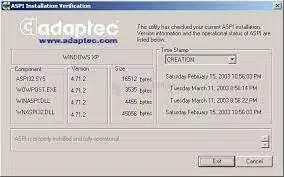
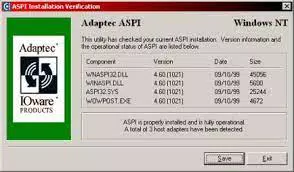
- ASPICHK Version Checking Utility – This built-in tool enables users to verify the installed version of the ASPI layer on their system. It provides immediate feedback on whether the current driver version is up-to-date, simplifying troubleshooting and maintenance tasks.
- Enhanced Tagged Queuing Support – The update enables tagged queuing for read and write commands, allowing storage devices to process multiple I/O operations simultaneously. This optimizes command execution order based on physical data location, improving access speed and overall performance, especially in high-demand environments.
- Stable and Reliable Data Transfer – The drivers ensure consistent and error-resistant communication between the OS and SCSI hardware. This reduces data corruption risks and improves device responsiveness, critical for mission-critical legacy systems.
- Easy Integration for Developers and End-Users – Designed with both technical and non-technical users in mind, the drivers support straightforward installation and maintenance. Developers can rely on a stable ASPI layer for application development, while end-users benefit from minimal setup effort and reliable operation.
For example, a system administrator maintaining a Windows XP server for archival backups can use the ASPICHK utility to confirm driver integrity before critical operations. Similarly, a developer working on a legacy application requiring SCSI access can integrate the drivers without complex configuration, ensuring compatibility and stability.
Interface, UX & Performance
The Adaptec ASPI Drivers are command-line and system-level utilities, meaning they do not feature a graphical user interface (GUI) or interactive screens. Instead, functionality is accessed through system integration, installation scripts, and utility tools like ASPICHK. As such, the user experience is primarily technical and targeted toward advanced users or system administrators.
Navigating the installation process involves standard Windows driver setup procedures, including driver signing and system restarts when required. The absence of a GUI simplifies the core functionality but requires users to have a foundational understanding of driver management and system configuration. The performance of the drivers is focused on reliability and compatibility rather than speed optimization, which is appropriate for their intended legacy environment.
Although the developer did not list formal performance metrics, the update’s focus on tagged queuing and stable data transfer suggests improvements in I/O efficiency and error reduction. The drivers are lightweight, with a file size of 1.2 MB, indicating minimal system resource consumption. Responsiveness and stability are expected to be consistent across supported platforms, though real-world testing on older hardware may vary.
Platform Compatibility & Technical Requirements
The Adaptec ASPI Drivers are designed for the Windows operating system. They are compatible with Windows 98, Windows NT 4.0, Windows Me, Windows 2000, and Windows XP. The software version is 4.71.2, and the file size is 1.2 MB. The drivers are distributed at no cost, with a price of Free.
The developer did not specify minimum OS requirements beyond the listed platforms. Compatibility with newer Windows versions such as Windows 7 or later is not confirmed. Users are advised to verify system architecture (32-bit or 64-bit) before installation, as the driver may not support all configurations. The developer did not provide additional technical details regarding hardware requirements or installation prerequisites.
Pros and Cons
Pros
- Free to download and use, making it accessible for legacy system maintenance.
- Supports a wide range of legacy Windows operating systems, including older versions still in use.
- Includes the ASPICHK utility for easy version verification and troubleshooting.
- Enhanced tagged queuing improves I/O performance on SCSI devices.
- Designed for stability and reliability in mission-critical legacy environments.
Cons
- No graphical interface; requires technical knowledge for installation and use.
- Not compatible with modern Windows versions beyond XP.
- Development and updates ceased in 2007; no ongoing support or security patches.
- File size is small, but may not be sufficient for users needing additional tools or documentation.
- Compatibility with 64-bit systems is not confirmed.
FAQ
Is Adaptec ASPI Drivers compatible with Windows 10 or Windows 11?
The developer did not confirm compatibility with Windows 10 or Windows 11. The drivers are officially designed for Windows 98 through Windows XP.
Can I install these drivers on a 64-bit system?
Compatibility with 64-bit systems was not specified. The drivers were primarily developed for 32-bit Windows environments.
Is the ASPICHK utility safe to use?
Yes, the ASPICHK utility is part of the official Adaptec ASPI Drivers package and is designed to safely check driver versions without modifying system files.
Do I need to update the drivers regularly?
Since the software was last updated in 2007, no official update schedule exists. However, using the ASPICHK utility can help verify current version status and ensure proper functionality.
Are the drivers secure to download and install?
The drivers are provided by Adaptec and distributed as free software. While no security vulnerabilities are publicly documented, users should install only from trusted sources due to the age of the software.
Final Thoughts
The Adaptec ASPI Drivers version 4.71.2 remain a vital tool for users maintaining legacy systems that rely on SCSI hardware. Despite being over 15 years old, the drivers continue to deliver reliable performance, enhanced data transfer stability, and critical tagged queuing support. Their inclusion of the ASPICHK utility adds a layer of diagnostic convenience, making system maintenance more manageable.
While the lack of a GUI and support for modern operating systems limits their accessibility, they are unmatched in their niche. This makes them ideal for IT professionals, retro computing enthusiasts, and organizations with long-term archival or operational needs on older infrastructure.
For anyone working with legacy Windows environments and SCSI devices, the value proposition is clear: a lightweight, free, and proven solution that keeps outdated systems running efficiently. The drivers represent a rare example of enduring utility in a rapidly evolving tech landscape.
Download Adaptec ASPI Drivers now


